 CHRRY
 1 / 6 · Player and world ESP
WarDogs Full.
Choose 1, 7 or 30 days of access. Your license key is delivered after the payment is confirmed.
Save your order number. View the key on the order page, or in your account if you signed in before purchase.
WHAT’S INSIDE
Product features.
Classic and Gladiator themes. Theme-specific features are marked below.
Players
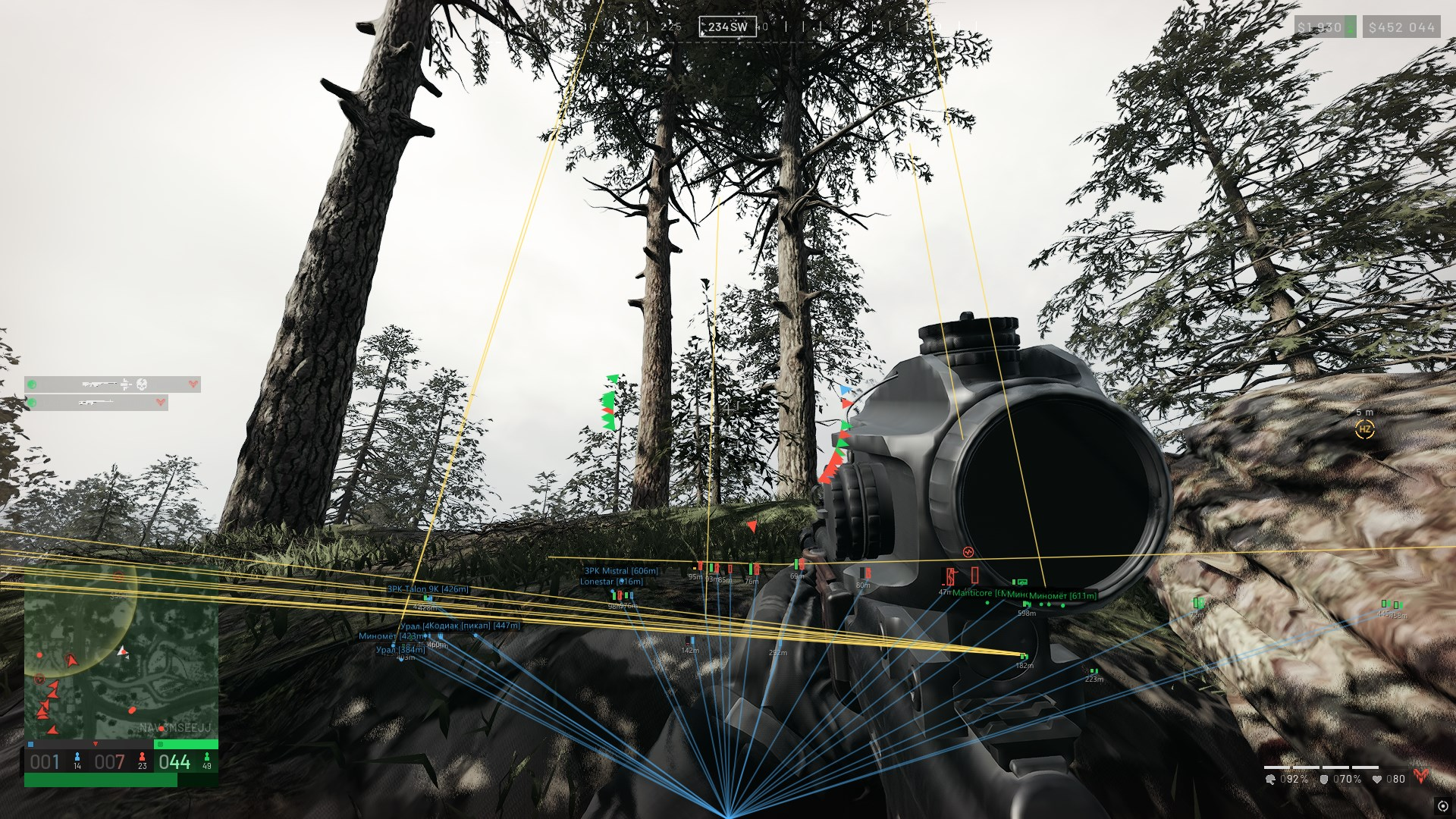
- Display layers
- Foreground (Players / Vehicles / World objects)
- Elements
- ESP enabled
- Boxes
- Names
- Distance
- Skeleton
- Snap lines
- Show all joints
- Use entity color — for the skeleton
- Combat
- No recoil
- No spread
- Vector aim
- Enable aim
- Ignore teammates
- Hold key (RMB / LMB / MMB / M4 / M5 / Shift / Ctrl / Alt / Custom key)
- Target priority (Closest to crosshair / Closest by distance)
- Aim radius
- Max distance — 10–1000 m
- Keep target
- Show aim circle
- Aim circle color
- Regular aim (in Classic, when projectile teleport is disabled)
- Target bone (Head / Neck / Chest / Pelvis)
- Smoothing
- Movement limit
- Dead zone
- Projectile teleport (Classic only)
- Enable projectile teleport
- Without skeleton (Upper quarter of box / Box center) — when projectile teleport is enabled
- Offset from hit point — 1–500 cm, when projectile teleport is enabled
- Approach side (From shot origin / In front of target / Behind target / Above / Below / Target left / Target right) — when projectile teleport is enabled
- Mortar aiming
- Enable mortar aiming
- Target on the left — key binding; Esc clears the binding
- Target on the right — key binding; Esc clears the binding
- Ready indicator tolerance
- Ignore players
- Ignore vehicles
- Ignore buildings
- Ignore containers
- Ignore supplies
- Ignore doors
- Ignore repair stations
- Camera
- Custom viewmodel FOV
- Hands and weapon FOV — 30–250°, when custom viewmodel FOV is enabled
- Crosshair
- Crosshair style (None / Cross / Dot)
- Line thickness — for the cross
- Dot size — for the dot
- Horizontal extension — for the cross: 0–100%, extending left and right to the screen edges
- Vertical extension — for the cross: 0–100%, extending up and down to the screen edges
- Filters
- Dead bodies
- Teammates
- Real player team colors
- Health
- Health bar
- Numeric HP
- Health bar width
- State: critical / dead
- Weapon and armor
- Held weapon / item
- Rounds in magazine
- Head / chest durability
- Head / chest armor bars
- Weapon position (Below box / Right of box)
- Equipment text scale
- Armor bar thickness
- Armor bar color
- Distances
- Max distance — 10–1000 m
- Skeleton distance — 10–1000 m
- Text size
- Box appearance
- Box style (Full rectangle / Corners / Shadow / Top and bottom bars)
- Box thickness
- Box opacity
- Fill opacity
- Corner length — for Corners and Top and bottom bars
- Corner thickness — for Corners
- Box color by visibility — experimental render-based estimate
- Box color: visible enemy
- Box color: hidden enemy
- Snap lines (when enabled)
- Line origin (Bottom / Center / Top)
- Line thickness
- Smoothing
- Smooth boxes
- Box response
- Smooth skeleton
- Skeleton response
World
- Global
- World label background
- Label padding
- Label rounding
- World label background color
- World objects
- Show on radar
- Hide zero-position objects
- Max rendered objects
- Bullet tracers
- Show bullet tracers
- Fade time
- Max distance — 25–1200 m
- Thickness
- Max visible traces
- Line color
- Vehicles
- Category enabled
- Display on minimap
- Display on map
- Marker
- Name
- Distance
- Overall HP (hull)
- Occupants / seats — occupied / total seats, including the driver and gunners
- Vehicle parts
- HP of each part — when vehicle parts are shown
- Parts position (Above vehicle / Below vehicle) — when vehicle parts are shown
- Max distance — 25–1200 m
- Text scale
- Marker size
- Color
- Buildings
- Category enabled
- Display on minimap
- Display on map
- Marker
- Name
- Distance
- Max distance — 25–1200 m
- Text scale
- Marker size
- Color
- Containers
- Category enabled
- Display on minimap
- Display on map
- Marker
- Name
- Distance
- Max distance — 25–1200 m
- Text scale
- Marker size
- Color
- Supplies
- Category enabled
- Display on minimap
- Display on map
- Marker
- Name
- Distance
- Max distance — 25–1200 m
- Text scale
- Marker size
- Color
- Doors
- Category enabled
- Display on minimap
- Display on map
- Marker
- Name
- Distance
- Max distance — 25–1200 m
- Text scale
- Marker size
- Color
- Repair stations
- Category enabled
- Display on minimap
- Display on map
- Marker
- Name
- Distance
- Max distance — 25–1200 m
- Text scale
- Marker size
- Color
Radar
- Global
- Radar enabled
- Layout
- Size
- Range — 10–1000 m
- Opacity
- X position (0 = left, 1 = right)
- Y position (0 = top, 1 = bottom)
- Shape (Circle / Square)
- Features
- Rotate with camera
- Show names
- Show view direction
- In-game maps
- Markers on minimap
- Markers on map (M)
- Player view directions
- Extend line to me
Skeleton
- Global
- Skeleton
- Skeleton distance — 10–1000 m
- Skeleton opacity
- Skeleton glow
- Glow scale
- Show all joints
- Use entity color
- Smooth skeleton
- Skeleton response
- Skeleton customizer
- Edit selection
- All bones together
- Head
- Neck
- Spine to pelvis
- Left shoulder
- Right shoulder
- Left upper arm
- Left forearm
- Right upper arm
- Right forearm
- Left thigh
- Right thigh
- Left calf
- Left foot
- Right calf
- Right foot
- Visible
- Thickness
- Line color
- Joint dot
- Joint radius
- Joint color
- Reset selected bone
- Reset all bones
- Edit selection
Colors
- ESP colors
- Dead
- Unknown
- Outline
- Distance
- Snap line color
- Line opacity
- Health
- Health: high
- Health: medium
- Health: low
- Weapon and armor
- Armor bar color
- Team colors
- Team 0
- Team 1
- Team 2
- Reset colors
System
- Hotkeys
- Menu toggle
- ESP toggle
- Exit
- Display
- Menu scale
- Menu opacity
- VSync
- Hide overlay from capture
- Overlay visibility (Game only / Always / Radar when unfocused)
Config
- Save
- Config name
- Save config
- Saved configs
- Select a config from the list
- Load config
- Delete config
- Refresh list
- Reset
- Reset all settings
Menu interface
- Language (Russian / English)
- Settings search with navigation to the control (Ctrl+F, slash key, or search button)
- Manual slider value entry (double-click the value; Enter or Space when focused)
- ESP and skeleton preview on the Players and Skeleton tabs
- Remaining subscription time
- Move the window by dragging the title bar
- Close menu (close button / Esc)